Automarket – high-precision tracking and analytics for physical operations

We show how staff, customers and equipment move indoors. Precise data and AI analytics help reduce losses, optimise routes and order picking, and improve staff efficiency and customer experience

Automarket Visualiser Realtime
Site map: a picker walks an order route, the system compares it with the optimal route and highlights delay hotspots Start Checkout A1A2A3A4A5A6A7 B1 D1D2D3 C1 TAG-30A
Actual route Optimal route Delay hotspots
Automarket tracker

Not just coordinates

Automarket captures movement inside a site and turns it into routes, idle time, zone dwell, load peaks, heatmaps and reports for operational decisions
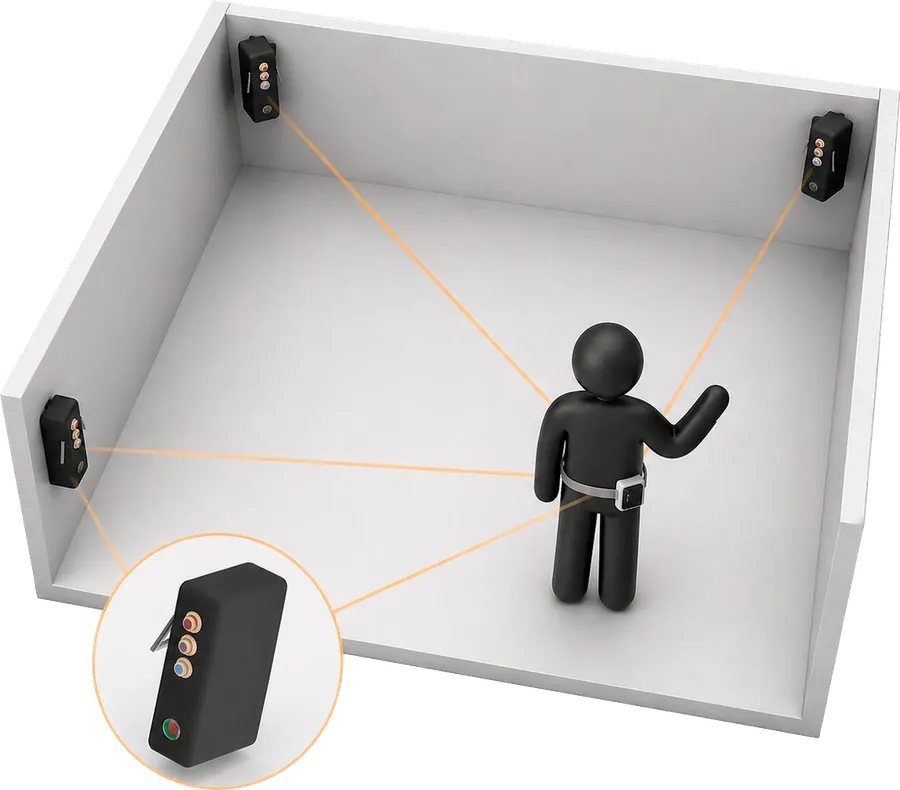
A room with anchors on the walls and an employee wearing a tracker on the belt
Tags go on people and objects, anchors on the walls. The system calculates each tag's position indoors

How Automarket works

  1. Tags

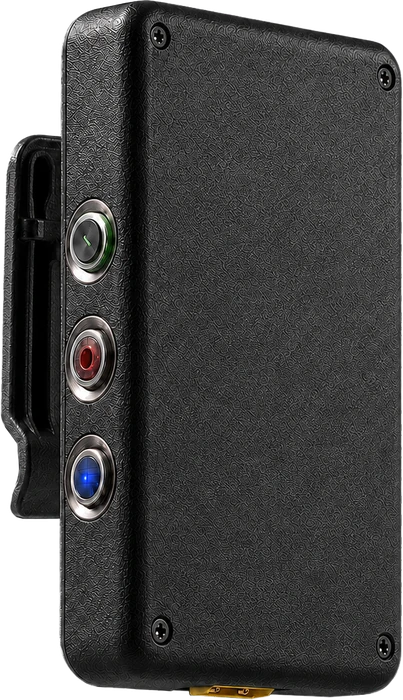
    Trackers on staff, baskets, orders or equipment

  2. Anchors

    Typically 3⁠–⁠15 points per site form the positioning infrastructure

  3. Algorithms

    UWB + IMU fusion, outlier filtering, signal quality scoring, trajectory recovery and smoothing

  4. Visualiser

    Realtime and DVR, site map, history, roles, objects and orders

  5. Analytics

    Routes, stops, zones, peaks, heatmaps, reports and export

  6. Decision

    Improvement hypotheses, before/after comparison, rollout across the network

What the system shows

Compare shifts and scenarios, find extra walking and waiting, test layout changes and export results in a clear format

See use cases

Routes

The actual path of a person, basket or order and its deviation from the optimum

Idle time

When an object stopped, how long the pause lasted and in which zone it happened

Zone dwell

Dwell time in the kitchen, buffer, aisles, checkouts and merchandising zones

Load peaks

When and where process density rises — the basis for reallocating staff

Order picking

Path length, picking time, pick points, product search, pauses and extra passes

Heatmaps

Movement density, bottlenecks, unused areas and overloaded aisles

Customer journey

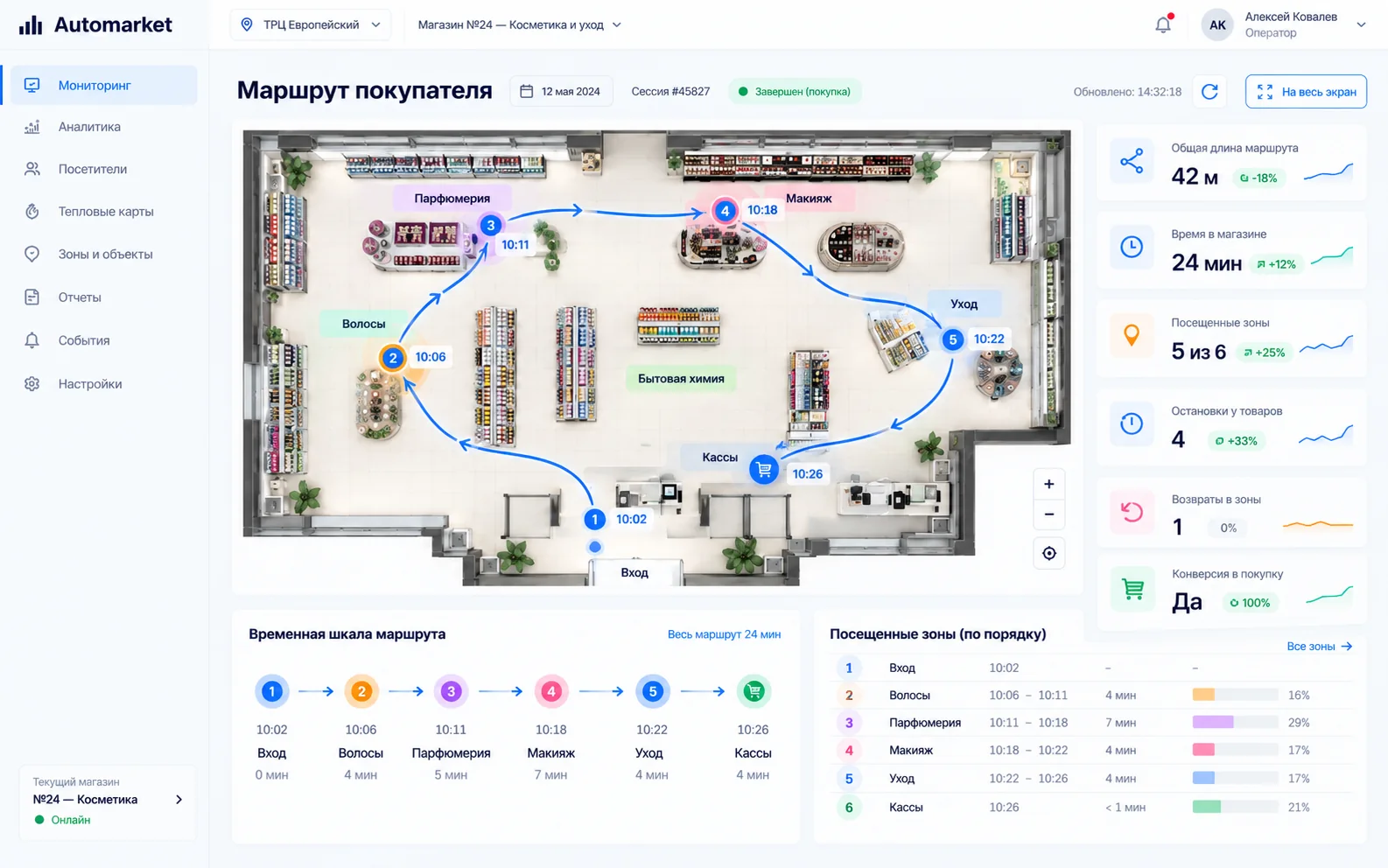
With trackers on baskets: shopper routes, areas of interest, abandoned baskets

Before/after

The effect of a change in layout, process or staffing

Export and reports

XLSX, CSV, PNG and MP4 — data flows into BI and internal systems

Integrations

WMS, ERP, timesheets, receipts, orders and API — to fit the client's scenario

Swipe the cards sideways

Demo: real Visualiser screens

Three screens of the web platform that pilot analytics is built on
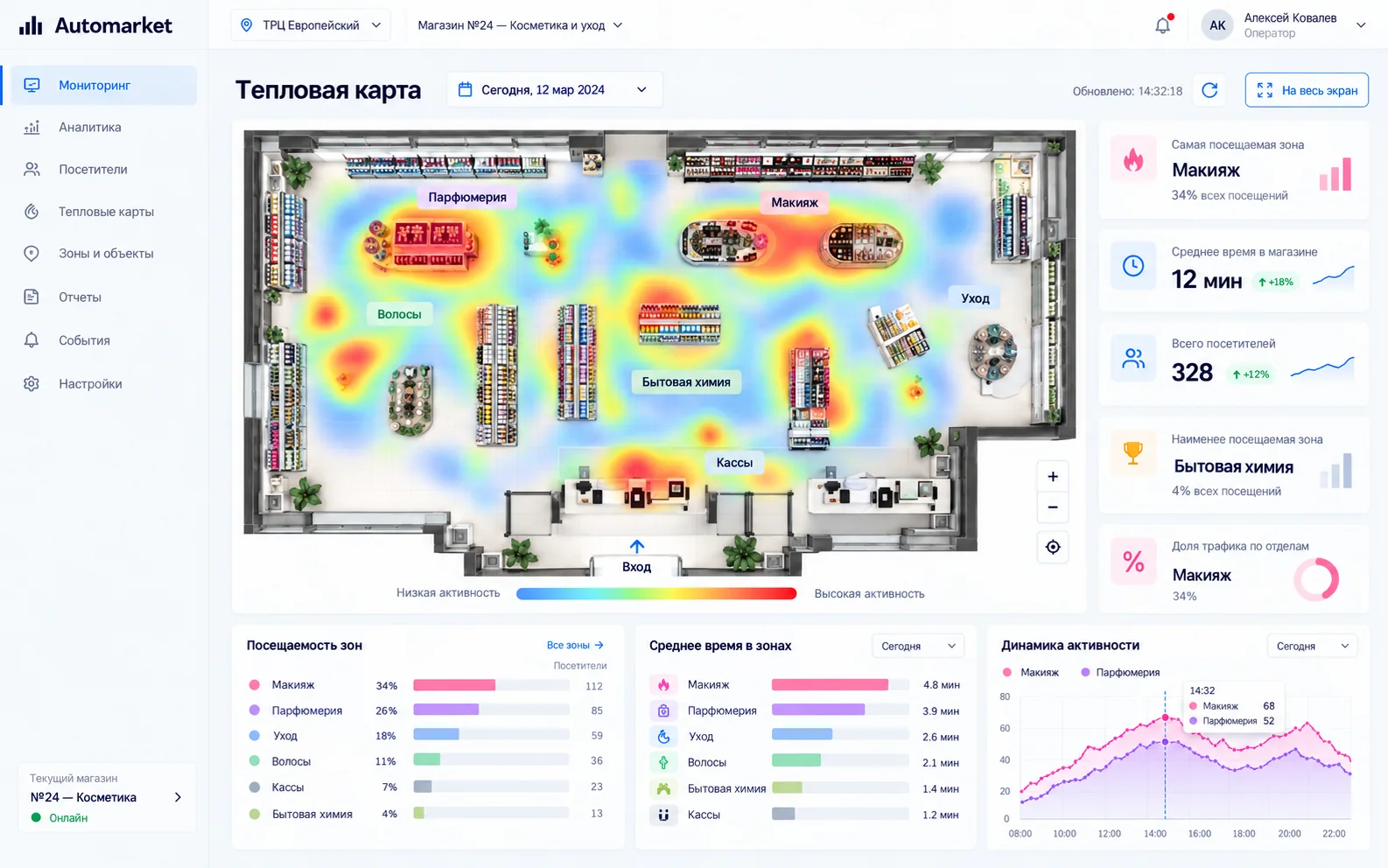
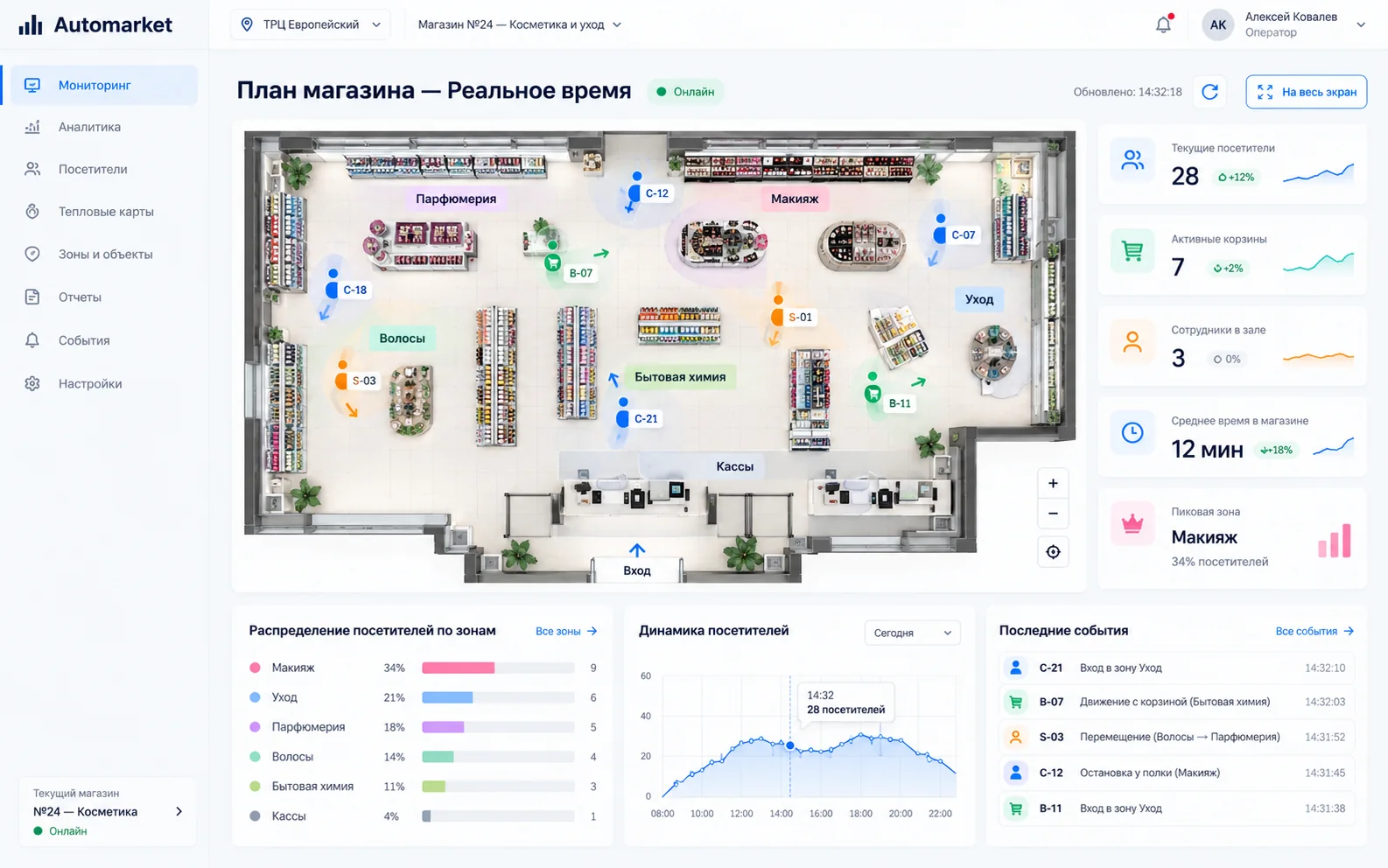
Visualiser screen: heatmap of a cosmetics store and zone statistics

Heatmap and zone traffic

On screen
Activity by zone over the day, the most and least visited zones, average time in zones and hourly dynamics
What you get
Bottlenecks and unused zones become the basis for moving shelves and staff
1 / 3

Technology

UWB + IMU is why the data can be trusted. Figures are design values and depend on the site configuration

Technology
UWB + IMU
Accuracy
5⁠–⁠8 cm
Update rate
up to 10 Hz
Anchors
typically 3⁠–⁠15 per site
Range
up to 100 m, depending on conditions
Deployment
installation in 4 to 7 days, tuning 1⁠–⁠2 weeks
Export
XLSX, CSV, PNG, MP4
Integrations
WMS, ERP, timesheets, orders, receipts, API

Process data, not surveillance

The core stack runs on UWB and IMU — no cameras, face recognition or biometrics. Data access is role-based, and analytics can run on depersonalised tags. Video analytics can be added separately if the project needs it

Integrations

Automarket can link movement data with orders, WMS/ERP, timesheets, POS data and the client's BI stack

  • WMS
  • ERP
  • Timesheets
  • Orders
  • Receipts
  • BI
  • API
  • CSV / XLSX

Pilots and deployments with partners

Every project is shown with its actual status. Click a card to open a detailed case breakdown

Yandex Lavka

PilotingDark stores

Up to 20% faster picking

Optimised routes for pickers

Yandex Market

PilotingSort centre

Up to ₽1M per month per sort centre

Monitoring pallet placement in storage and loading zones

Magnit Kosmetik

Pilot in 2 storesStores

Optimising sales floor operations

Staff efficiency and service quality

Yandex Lavka

Piloting

Yandex Lavka is a fast grocery delivery service. Orders are picked by staff in the service's own dark stores, so picking speed directly determines how quickly a customer gets their order

Dark store plan with picker tracks between shelving, fridges and packing tables
Picker tracks on a dark store plan
Task
Optimised routes for pickers
Goal
Reduce order picking time
What the system does
  • Tracks pickers' movement around the dark store
  • Builds optimised picking routes
  • Shows how shelf layout affects picking speed
  • Finds idle time and waiting
Impact in the case
Up to 20% faster picking

Yandex Market

Piloting

Yandex Market is one of Russia's largest marketplaces. Orders pass through sort centres, where parcels are grouped on pallets by destination and loaded into trucks. A pallet in the wrong row or the wrong truck means a delivery delay and an extra trip

Diagram: pallet rows in the loading zone and trucks by destinationR22EKBR23EKBR24SPBEKBSPBSMR
In the right rowPlaced unevenlyIn the wrong rowRoute to the truck for its destination
Control scheme: pallet rows in the loading zone and trucks by destination
Task
Monitoring pallet placement in storage and loading zones
Goal
Fewer manual direction checks and mis-sent pallets
What the system does
  • Checks whether a pallet is in the right row and placed straight
  • Matches pallets to the truck for their destination and logs loading errors
  • Gives management a live view of zone occupancy, deviations and operation times
Impact in the case
Up to ₽1M per month per sort centre

Magnit Kosmetik

Pilot in 2 stores

Magnit Kosmetik is a chain of cosmetics and household goods stores within the Magnit retail group. On the sales floor it matters where staff spend their time and how customers move around the store

Visualiser screen with a heatmap of site zones
This is what a heatmap looks like in Visualiser. Pilot data is not published
Task
Optimising sales floor operations
Goal
Staff efficiency and service quality
What we track
  • Customer path across the floor: route, zones of interest and time at shelves
  • Customer–employee contacts: where, when and how long a consultation lasts
  • Zones where customers wait for help but no employee is nearby
  • Staff load by zone and time of day
Stage
The system has been agreed with the partner and is being deployed on site
Results
Published once approved by the partner

How we run a pilot

One site, KPIs agreed before the start, scaling only after the impact is confirmed

  1. Quick diagnosticsSite map, processes and KPIs
  2. Pilot from two weeks to 2 monthsTags, anchors and data collection
  3. ROI and analytics reportBefore/after comparison
  4. RolloutNew zones and sites
Get a pilot plan

Pilot FAQ

Briefly about timing, data and integrations. Click a question to see the answer

How long does a pilot take?

A pilot lasts from two weeks to 2 months. The exact timing depends on the site, the map, the number of trackers and integrations

What can be tracked?

Staff, baskets, orders, equipment and any other objects a tag can be attached to

Do we need cameras?

No. The core Automarket stack runs on UWB/IMU and doesn't need face recognition. Video can be used separately as an extra source if the project needs it

Can it integrate with our systems?

Yes. The architecture supports data export and integrations with WMS/ERP, orders, timesheets, receipts and your BI stack

What do we get after the pilot?

A map of actual routes and zones, a set of operational metrics, exports and conclusions on improvement hypotheses

Can the analytics be adapted to our process?

Yes. Zones, events, reports and integrations are configured for the specific pilot task

Watch the 30-second video

Partners

Companies we develop the technology and projects with

  • MagnitMagnit
  • VkusVillVkusVill
  • Yandex LavkaYandex Lavka
  • X5 GroupX5 Group
  • Yandex MarketYandex Market

Get in touch

How can we reach you
Tell us more about the taskOptional — helps us prepare the pilot
Site type
Custom developmentOptional — a case similar to ours or a new product
What you need

Quick links